This guide follows the current ChoCo firmware source. Check the hardware details against your board revision.
Get started
ChoCo is an RP2040 USB MIDI chord controller. It needs a USB data cable and a MIDI monitor, software instrument, or DAW to make sound. If you already have an assembled board, these steps get you to the first chord:
- Get a
ChoCo-firmware.uf2from ChoCo Releases, if one is available, or build it with PlatformIO as described below. - Disconnect the board. Hold BOOTSEL while connecting it to your computer.
- Copy the UF2 to the RPI-RP2 drive. The board restarts after the copy.
- Select ChoCo’s USB MIDI input in your MIDI host and load an instrument.
- Hold keypad 0 to play the first scale degree. Move the joystick to change the chord; release it to return to the base triad.
The initial root is C4 and the initial scale is Ionian (major). The USB device name may use the RP2040 core’s default descriptor unless custom descriptors were enabled in the firmware.
Controls
The three-row keypad and joystick are shown below in their physical positions. The labels follow the firmware.
0–6 Play scale degrees 1–7. A newly pressed degree takes over.
A Raise the root by one semitone. B Select the next scale.
C Hold as a modifier for the shortcuts below.
Joystick tilt Vary a held chord; center restores its base triad.
Joystick press Short: stop the chord. Long: toggle single-note mode.
The scale choices are Ionian, Dorian, Phrygian, Lydian, Mixolydian, Aeolian, Locrian, harmonic minor, and melodic minor.
Joystick shortcuts
| Gesture | Action |
|---|---|
| Hold a degree, move the stick | Apply a chord variation; return to center for the base triad |
Hold C, move left / right | Shift octave down / up |
Hold C, move down | Cycle joystick mode: DEFAULT, EXTEND, CHROM |
Hold C, short press stick | Toggle bass |
Hold C and A, short press stick | Toggle strum; this cancels the latch shortcut |
Hold C, long press stick | Toggle smart voicing |
Short press stick without C | Stop the current chord and cancel pending strum notes |
Long press stick without C | Toggle single-note mode |
In CHROM, move left / right with no chord held | Lower / raise the root by one semitone |
A short press is under 500 ms; a long press is handled after 1000 ms. The stick uses separate engage and release thresholds so a direction remains selected as it moves partway toward center.
Shape a chord
The joystick has three variation maps. With a degree held, each direction chooses the chord in the table. For a slash-separated pair, the first choice applies to major or augmented base triads; the second applies to other triads.
| Direction | DEFAULT | EXTEND | CHROM |
|---|---|---|---|
| Up | Minor / Major | Minor / Major | Minor-major 7 |
| Down | Sus4 | 7♯9 | Major 13 |
| Left | Diminished / Minor | Sus4 + 7 | Half-diminished 7 |
| Right | Major 7 / Minor 7 | Add11 | 6/9 |
| Up-left | Augmented | Half-diminished 7 | Major 7♯11 |
| Up-right | Dominant 7 | Dominant 9 | Dominant 13 |
| Down-left | Major 6 / Sus2 | Add9 | Dominant 7♭9 |
| Down-right | Major 9 / Minor 9 | Minor 11 | Dominant 7 altered |
These labels follow getChordVariationForDirection() in the firmware. Returning to center restores the diatonic triad for the selected degree.
Modes and display
- Latch (
LAT) keeps the last chord sounding after a degree is released. - Bass (
BAS) adds a root note one octave below the chord and updates the sounding chord immediately when toggled. - Strum (
STR) staggers note starts. Pending notes are cancelled when a chord is released or replaced. - Smart voicing (
VOI) seeks a compact transition between chords. Its setting applies to the next generated chord. - Single note (
NOTE) plays only the selected degree note.
The OLED shows the selected key and scale, the active degree or EDIT, the chord name, mode badges, and NEXT harmonic suggestions. NEXT is a set of suggestions, not a prediction. Status messages briefly replace the footer. Display refresh is limited to about 100 ms, and a sounding chord keeps the screen awake.
Screen layout
These are illustrative redraws of the firmware’s 128×64 monochrome layout, rather than photographs of a running board. Chord names, mode badges, and suggested degrees change with input.
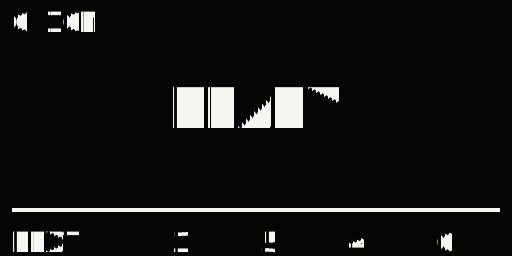
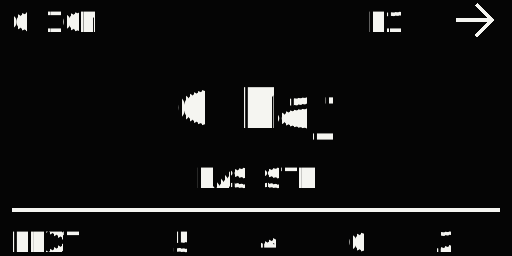
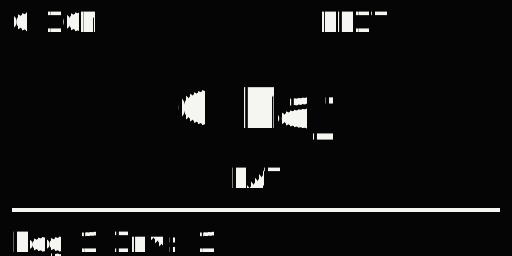
The top line shows key and scale, then D1–D7 for the sounding degree or EDIT while C is held. The center shows the current chord name. Active mode abbreviations sit below it. A temporary status message replaces only the NEXT line.
Each key and the joystick button use 10 ms stable-edge debouncing. A newly pressed degree replaces the sounding one. Releasing it stops playback unless latch is enabled; an older held degree does not replay automatically. Exactly simultaneous degree presses select the lowest degree. Some multi-key combinations can produce matrix ghosting on hardware without per-key diodes.
Hardware
The ChoCo hardware directory contains the KiCad schematic, PCB, project file, and a ChoCo_REV-02.zip board archive. Check the archive contents and your board revision before ordering or assembling. The repository does not currently include a verified component BOM; use the schematic and PCB for footprints and values.
The firmware defaults in lib/Config/Config.h are:
| Function | RP2040 pin | Detail |
|---|---|---|
| Keypad rows | GP2, GP1, GP0 | Three rows |
| Keypad columns | GP3, GP4, GP5, GP6 | Four columns with input pull-ups |
| Joystick X / Y | A0 / A1 | Analog; firmware swaps and inverts axes for the current PCB revision |
| Joystick button | GP13 | Active low with input pull-up by default |
| OLED SDA / SCL | GP14 / GP15 | I²C1 (Wire1), address 0x3C |
The display is an SSD1306-compatible 128×64 I²C OLED. Verify the voltage, pin order, and wiring of the actual module before powering it.
3D-printed case
The case files contain three separate STL models from the Fusion 360 design:
| Part | Download | Size at millimeter scale (X × Y × Z) |
|---|---|---|
| Open top frame | ChoCo-top.stl | 148.5 × 70.5 × 7 mm |
| Chocolate-bar bottom | ChoCo-bar-bottom.stl | 148.5 × 70.5 × 7 mm |
| Joystick cap | ChoCo-thumbstick.stl | 14.5 × 14.5 × 7.5 mm |
Import each STL in millimeters at 100% scale, then arrange it on the build plate. The prototype was printed on a Bambu Lab P2S using PLA and/or PLA+; PLA is the intended material. Layer height, supports and fastening details have not been recorded, so there is no tested slicer profile yet. Check the fit with your actual board and switches before printing all parts.
For MakerWorld, upload these STLs as model files. A Bambu Studio 3MF saved with printer and print settings is needed for a print profile. The same STLs can be uploaded to Printables. The case notes include the prototype photos and file details.
Firmware
The ChoCo firmware repository uses PlatformIO with one pico environment and the Arduino RP2040 core. In the firmware repository root:
pio run
pio run -t upload
pio device monitor
The build produces .pio/build/pico/firmware.uf2. You can copy that file to the BOOTSEL RPI-RP2 drive instead of using pio run -t upload. platformio.ini has a machine-specific upload_port = COM5; override it locally if your board uses another port. The TinyUSB and network-disable build flags are required by this firmware’s USB MIDI setup.
Release builds set CHOCO_LOG_LEVEL to CHOCO_LOG_LEVEL_NONE, so the serial monitor is intentionally quiet. For diagnostics, temporarily choose INFO or DEBUG in lib/Config/Config.h, rebuild and flash, then run pio device monitor. Restore NONE for normal use. C + B prints chord history only when INFO logging or higher is enabled; otherwise the OLED says Serial log OFF.
Configuration
Pin mappings, thresholds, timings, default modes, and feature switches belong in lib/Config/Config.h.
| Setting | Default | Purpose |
|---|---|---|
JOYSTICK_TRIGGER_ENGAGE_PCT / JOYSTICK_TRIGGER_RELEASE_PCT | 72 / 55 | Direction hysteresis; engage must exceed release |
JOYSTICK_SWAP_AXES, JOYSTICK_INVERT_X, JOYSTICK_INVERT_Y | 1, 1, 1 | Current PCB orientation |
INPUT_DEBOUNCE_MS | 10 | Stable press and release edges |
UI_REFRESH_MS | 100 | OLED refresh interval |
SCREENSAVER_TIMEOUT_MS | 30000 | Idle time before screensaver |
STRUM_NOTE_DELAY_MS | 14 | Time between strummed note starts |
CHOCO_LOG_LEVEL | NONE | Serial diagnostics level |
Joystick thresholds have compile-time guards: both must be 1–99, and release must be lower than engage. USB manufacturer and product strings can be configured, but custom USB descriptors are disabled by default.
Troubleshooting
| Symptom | Check |
|---|---|
| USB MIDI device missing | USB data cable, flashing result, MIDI host input selection, reconnection after flashing |
| MIDI events but no sound | Assign an instrument or software synth to the MIDI input |
| OLED stays blank | Power, I²C address 0x3C, GP14/GP15, I²C1 selection |
| Joystick points the wrong way | Axis swap and inversion settings; confirm on the mounted board |
| Keypad misses or repeats | Matrix wiring and 10 ms debounce setting |
| Stuck or late notes | Check latch and strum modes, then follow the physical tests in DEBUGGING.md |
The host tests do not emulate USB delivery, analog noise, matrix ghosting, OLED appearance, or end-to-end latency. Use a real board and MIDI host for those checks. The firmware repository’s DEBUGGING.md has a detailed acceptance checklist.
For contributors
src/main.cpp owns setup and the responsive event loop. The independent PlatformIO libraries under lib/ handle controls, chord logic, display, MIDI, and shared configuration. Cross-library includes must be declared in the consuming library.json without making dependency cycles. Keep long delays and heap allocation out of the hot loop.
CI builds the firmware and runs six native C++ host test programs. On Linux, macOS, or WSL with native g++:
bash test/run_host_tests.sh
pio run
There is no pio test target. The host suite covers chord and joystick logic, debouncing, display direction, cancellable strum, and the main loop with simulated GPIO, time, and MIDI. See CONTRIBUTING.md for PR expectations. ChoCo is distributed under the PolyForm Noncommercial License 1.0.0.